---
title: Cómo añadir instrucciones de la propiedad?
description: Sé más eficiente añadiendo información relevante una sola vez.
---
[Ir directamente al contenido](https://help.doinn.co/es/knowledge/añadir-instrucciones-de-propiedad#main-content)
- [Español](https://help.doinn.co/es/knowledge/a%C3%B1adir-instrucciones-de-propiedad)
- [English](https://help.doinn.co/en/knowledge/property-instructions)
- [Italiano](https://help.doinn.co/it/knowledge/aggiungere-istruzioni-proprietà)
Español
Traducciones de Mostrar submenú de
[Crear ticket de soporte](https://help.doinn.co/es/knowledge/kb-tickets/new?hsLang=es)
![logo\_horizontal\_negative\_v2\_help\_center-3.png\]](https://help.doinn.co/hs-fs/hubfs/logo_horizontal_negative_v2_help_center-3.png?height=50&name=logo_horizontal_negative_v2_help_center-3.png)
Abrir navegación principal
Cerrar navegación principal
- - [Español](https://help.doinn.co/es/knowledge/a%C3%B1adir-instrucciones-de-propiedad)
- [English](https://help.doinn.co/en/knowledge/property-instructions)
- [Italiano](https://help.doinn.co/it/knowledge/aggiungere-istruzioni-proprietà)
Español
Traducciones de Mostrar submenú de
- [Crear ticket de soporte](https://help.doinn.co/es/knowledge/kb-tickets/new)
- Contact Us
Contact Us
Hola. Como podemos ayudarte?
- No hay sugerencias porque el campo de búsqueda está vacío.
1. [Centro de ayuda](https://help.doinn.co/es/knowledge?hsLang=es)
2. [FAQ - Preguntas Frecuentes](https://help.doinn.co/es/knowledge/faq-preguntas-frecuentes?hsLang=es)
3. [2. Automatiza tareas - Programación, Asignación, Precios](https://help.doinn.co/es/knowledge/faq-preguntas-frecuentes?hsLang=es#2-automatiza-tareas-programaci%C3%B3n-asignaci%C3%B3n-precios)
29 de febrero de 2024
# Cómo añadir instrucciones de la propiedad?
## Sé más eficiente añadiendo información relevante una sola vez.
**Última actualización**: *11 de febrero de 2024*
**Se aplica a:** *Property managers, usuarios de software, o compradores de servicios PRO*
Si quieres evitar errores diarios con los detalles de la propiedad o instrucciones específicas y ser más eficiente al no tener que repetirlos al equipo cada vez que se programa un servicio, necesitas usar esta función en Doinn!
Rellenando toda la información relevante de una propiedad una sola vez, esta información se añadirá siempre automáticamente a cualquier servicio programado en esa propiedad.
#### Cómo utilizar esta función?
Accede a la pestaña **Propiedades** y selecciona una propiedad:
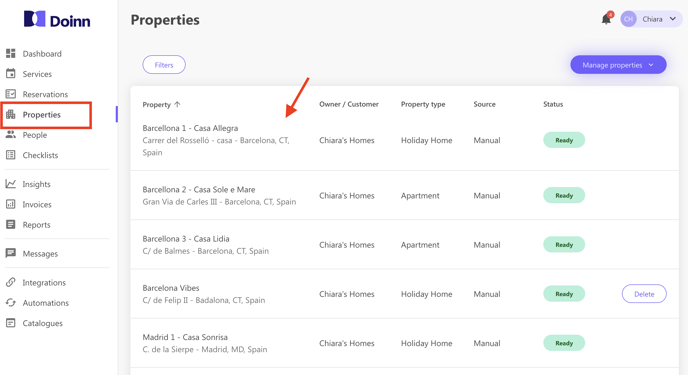
Pulsa **Instrucciones**. Aquí puedes rellenar **detalles importantes sobre la propiedad**, así como cualquier **requisito específico** que pueda tener.
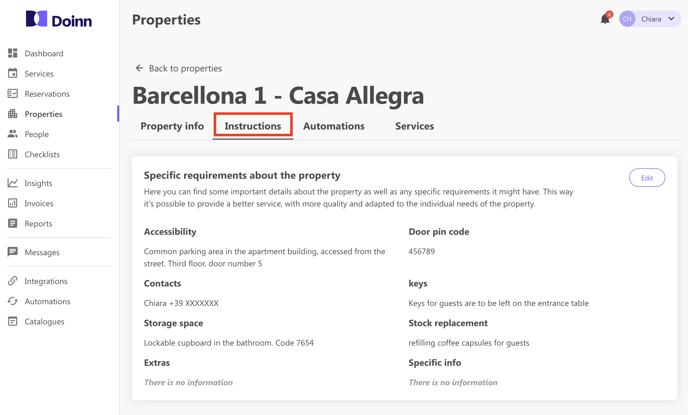
**Completando esta información por propiedad no necesitarás recordar compartir la información con el equipo, ya que esta aparecerá adjunta al servicio automáticamente.**
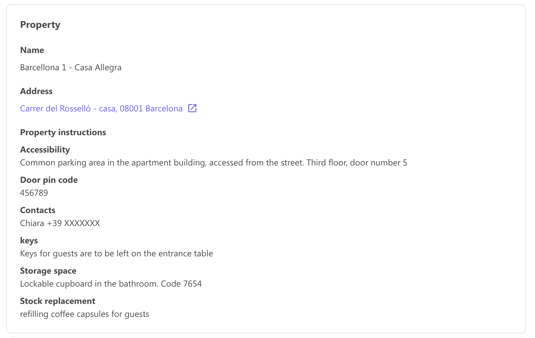
La siguiente imagen muestra cómo el equipo recibe la información de la propiedad, dentro de la solicitud de servicio:
Te recomendamos que utilices esta herramienta para facilitar tus operaciones diarias.
---
#### Actualiza todas las instrucciones a la vez
Para actualizar fácilmente las instrucciones de tu propiedad sin rellenarlas una a una, aquí tienes una forma más sencilla.
Accede a **Propiedades** y selecciona **Actualizar instrucciones** en el menú desplegable de la derecha (gestionar propiedades).
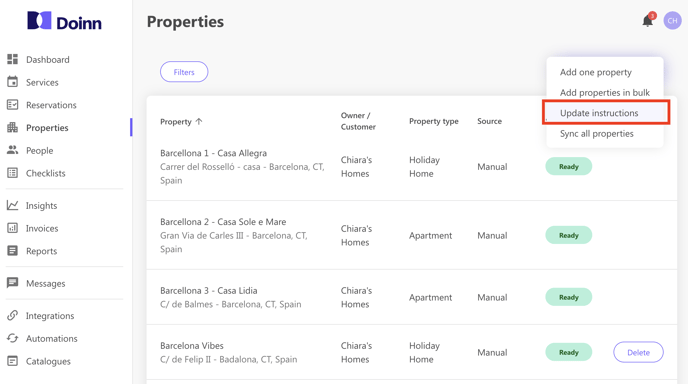
Aparecerá una nueva ventana. Aquí podrás **(1) descargar la plantilla Excel** y **(2) subir el mismo archivo** con todas las instrucciones cumplimentadas. Tus propiedades se actualizarán automáticamente.
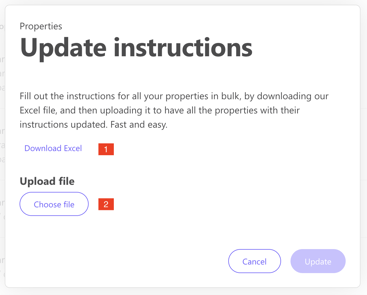
Extracto de un ejemplo de archivo Excel: 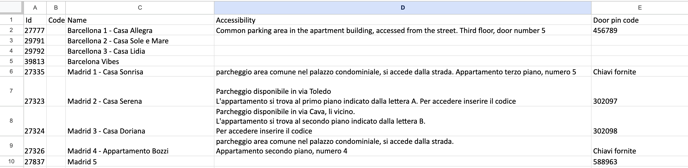
**Cada fila es la información por propiedad** y cada columna es una categoría de artículo *(accesibilidad, código pin de la puerta, contactos, llaves, espacio de almacenamiento, información específica...).*
- [Introducción](https://help.doinn.co/es/knowledge/introducci%C3%B3n?hsLang=es#main-content)
- [Configuración inicial](https://help.doinn.co/es/knowledge/introducci%C3%B3n?hsLang=es#configuraci%C3%B3n-inicial)
- [Cómo usar la plataforma Doinn](https://help.doinn.co/es/knowledge/c%C3%B3mo-usar-la-plataforma-doinn?hsLang=es#main-content)
- [1. Conecta con todos - Integraciones, Importaciones & CRM](https://help.doinn.co/es/knowledge/c%C3%B3mo-usar-la-plataforma-doinn?hsLang=es#1-conecta-con-todos-integraciones-importaciones-crm)
- [2. Automatiza tareas - Programación, Asignación, Precios](https://help.doinn.co/es/knowledge/c%C3%B3mo-usar-la-plataforma-doinn?hsLang=es#2-automatiza-tareas-programaci%C3%B3n-asignaci%C3%B3n-precios)
- [3. Mejora cada dia - Comunicaciones, Control de calidad, APP](https://help.doinn.co/es/knowledge/c%C3%B3mo-usar-la-plataforma-doinn?hsLang=es#3-mejora-cada-dia-comunicaciones-control-de-calidad-app)
- [4. Monitoriza - Informes, Análisis visual datos, Previsión](https://help.doinn.co/es/knowledge/c%C3%B3mo-usar-la-plataforma-doinn?hsLang=es#4-monitoriza-informes-an%C3%A1lisis-visual-datos-previsi%C3%B3n)
- [5. Compra servicios professionales](https://help.doinn.co/es/knowledge/c%C3%B3mo-usar-la-plataforma-doinn?hsLang=es#5-compra-servicios-professionales)
- [6. Vende servicios profesionales](https://help.doinn.co/es/knowledge/c%C3%B3mo-usar-la-plataforma-doinn?hsLang=es#6-vende-servicios-profesionales)
- [7. Cuenta & Facturación](https://help.doinn.co/es/knowledge/c%C3%B3mo-usar-la-plataforma-doinn?hsLang=es#7-cuenta-facturaci%C3%B3n)
- [FAQ - Preguntas Frecuentes](https://help.doinn.co/es/knowledge/faq-preguntas-frecuentes?hsLang=es#main-content)
- [1. Conecta con todos - Integraciones, Importaciones & CRM](https://help.doinn.co/es/knowledge/faq-preguntas-frecuentes?hsLang=es#1-conecta-con-todos-integraciones-importaciones-crm)
- [2. Automatiza tareas - Programación, Asignación, Precios](https://help.doinn.co/es/knowledge/faq-preguntas-frecuentes?hsLang=es#2-automatiza-tareas-programaci%C3%B3n-asignaci%C3%B3n-precios)
- [3. Mejora cada dia - Comunicaciones, Control de calidad, APP](https://help.doinn.co/es/knowledge/faq-preguntas-frecuentes?hsLang=es#3-mejora-cada-dia-comunicaciones-control-de-calidad-app)
- [4. Monitoriza - Informes, Análisis visual datos, Previsión](https://help.doinn.co/es/knowledge/faq-preguntas-frecuentes?hsLang=es#4-monitoriza-informes-an%C3%A1lisis-visual-datos-previsi%C3%B3n)
- [5. Compra servicios professionales](https://help.doinn.co/es/knowledge/faq-preguntas-frecuentes?hsLang=es#5-compra-servicios-professionales)
- [7. Cuenta & Facturación](https://help.doinn.co/es/knowledge/faq-preguntas-frecuentes?hsLang=es#7-cuenta-facturaci%C3%B3n)
- [Doinn AI 🆕](https://help.doinn.co/es/knowledge/doinn-ai?hsLang=es)
- [Resolución de Problemas](https://help.doinn.co/es/knowledge/resoluci%C3%B3n-de-problemas?hsLang=es)
- [Buenas prácticas](https://help.doinn.co/es/knowledge/buenas-pr%C3%A1cticas?hsLang=es#main-content)
- [1. Conecta con todos - Integraciones, Importaciones & CRM](https://help.doinn.co/es/knowledge/buenas-pr%C3%A1cticas?hsLang=es#1-conecta-con-todos-integraciones-importaciones-crm)
- [2. Automatiza tareas - Programación, Asignación, Precios](https://help.doinn.co/es/knowledge/buenas-pr%C3%A1cticas?hsLang=es#2-automatiza-tareas-programaci%C3%B3n-asignaci%C3%B3n-precios)
- [3. Mejora cada dia - Comunicaciones, Control de calidad, APP](https://help.doinn.co/es/knowledge/buenas-pr%C3%A1cticas?hsLang=es#3-mejora-cada-dia-comunicaciones-control-de-calidad-app)
- [7. Cuenta & Facturación](https://help.doinn.co/es/knowledge/buenas-pr%C3%A1cticas?hsLang=es#7-cuenta-facturaci%C3%B3n)
- [Integraciones](https://help.doinn.co/es/knowledge/integraciones?hsLang=es)
- [Centro de operaciones](https://help.doinn.co/es/knowledge/centro-de-operaciones?hsLang=es)
- [Gestores de propiedades](https://help.doinn.co/es/knowledge/gestores-de-propiedades?hsLang=es#main-content)
- [Crear y configurar propiedades](https://help.doinn.co/es/knowledge/gestores-de-propiedades?hsLang=es#crear-y-configurar-propiedades)
- [Novedades del software Doinn](https://help.doinn.co/es/knowledge/novedades-del-software-doinn?hsLang=es)
[](https://doinn.co/)
Copyright © 2026, Doinn APAC PTE Ltd