---
title: Set up for Cleaning Companies - I want Doinn to send me customers
description: Set up for Cleaning Companies - I want Doinn to send me customers
---
[Skip to content](https://help.doinn.co/en/knowledge/set-up-for-cleaning-companies-i-want-doinn-to-send-me-customers#main-content)
- [English](https://help.doinn.co/en/knowledge/set-up-for-cleaning-companies-i-want-doinn-to-send-me-customers)
- [Español](https://help.doinn.co/es/knowledge/configuración-para-empresas-de-limpieza-quiero-que-doinn-me-envíe-clientes)
- [Italiano](https://help.doinn.co/it/knowledge/configurazione-per-le-imprese-di-pulizia-voglio-che-doinn-mi-invii-i-clienti)
- [Português - Portugal](https://help.doinn.co/pt-pt/knowledge/set-up-para-empresas-de-limpeza-quero-que-a-doinn-me-envie-clientes)
English
Show submenu for translations
[Create support ticket](https://help.doinn.co/en/knowledge/kb-tickets/new?hsLang=en)
![logo\_horizontal\_negative\_v2\_help\_center-3.png\]](https://help.doinn.co/hs-fs/hubfs/logo_horizontal_negative_v2_help_center-3.png?width=140&height=63&name=logo_horizontal_negative_v2_help_center-3.png)
Open main navigation
Close main navigation
- - [English](https://help.doinn.co/en/knowledge/set-up-for-cleaning-companies-i-want-doinn-to-send-me-customers)
- [Español](https://help.doinn.co/es/knowledge/configuración-para-empresas-de-limpieza-quiero-que-doinn-me-envíe-clientes)
- [Italiano](https://help.doinn.co/it/knowledge/configurazione-per-le-imprese-di-pulizia-voglio-che-doinn-mi-invii-i-clienti)
- [Português - Portugal](https://help.doinn.co/pt-pt/knowledge/set-up-para-empresas-de-limpeza-quero-que-a-doinn-me-envie-clientes)
English
Show submenu for translations
- [Create support ticket](https://help.doinn.co/en/knowledge/kb-tickets/new)
Hello. How can we help you?
- There are no suggestions because the search field is empty.
1. [Help Center](https://help.doinn.co/en/knowledge?hsLang=en)
2. [Getting Started](https://help.doinn.co/en/knowledge/getting-started?hsLang=en)
3. [Set up the basics](https://help.doinn.co/en/knowledge/getting-started?hsLang=en#set-up-the-basics)
May 29, 2023
# Set up for Cleaning Companies - I want Doinn to send me customers
## Set up for Cleaning Companies - I want Doinn to send me customers
**Last Updated**: *April 21 2023*
**Applies to:** *All registered users with roles: owner, admin, coordinator (to create catalog) and only registered users with roles: owner, admin, manager (to share catalog)*
Doinn can help you providing new Customers, you only need to sign up in our website and follow the onboarding.
1. [Onboarding](https://help.doinn.co/en/knowledge/set-up-for-cleaning-companies-i-want-doinn-to-send-me-customers#onboarding)
2. [Become a seller](https://help.doinn.co/en/knowledge/set-up-for-cleaning-companies-i-want-doinn-to-send-me-customers#Catalogue)
3. [Payments](https://help.doinn.co/en/knowledge/set-up-for-cleaning-companies-i-want-doinn-to-send-me-customers#Payments)
4. [Add your team](https://help.doinn.co/en/knowledge/set-up-for-cleaning-companies-i-want-doinn-to-send-me-customers#team)
5. [Services](https://help.doinn.co/en/knowledge/set-up-for-cleaning-companies-i-want-doinn-to-send-me-customers#services)
6. [Invite Customers](https://help.doinn.co/en/knowledge/set-up-for-cleaning-companies-i-want-doinn-to-send-me-customers#Invite_customer)
---
### 1. Onboarding
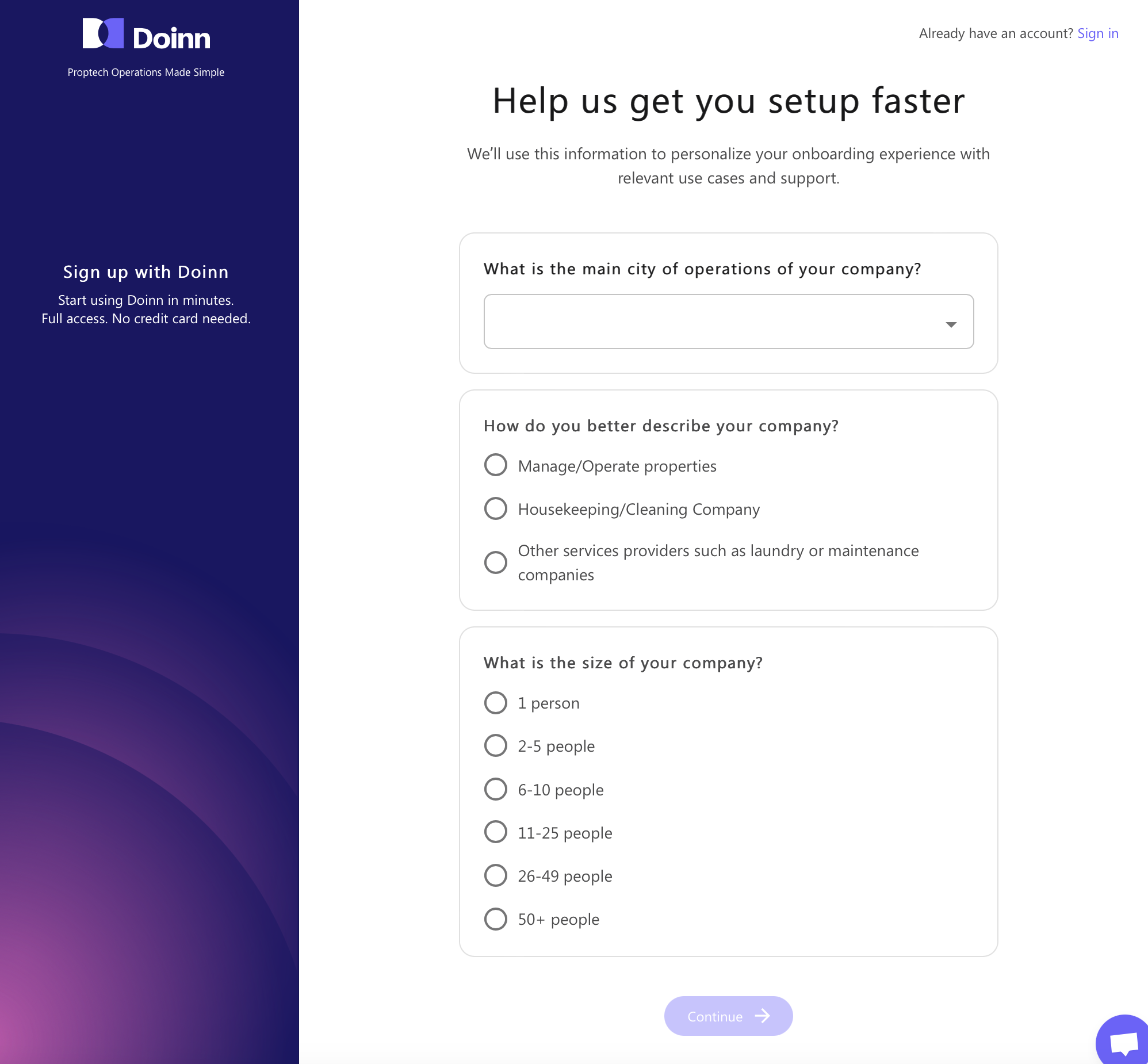
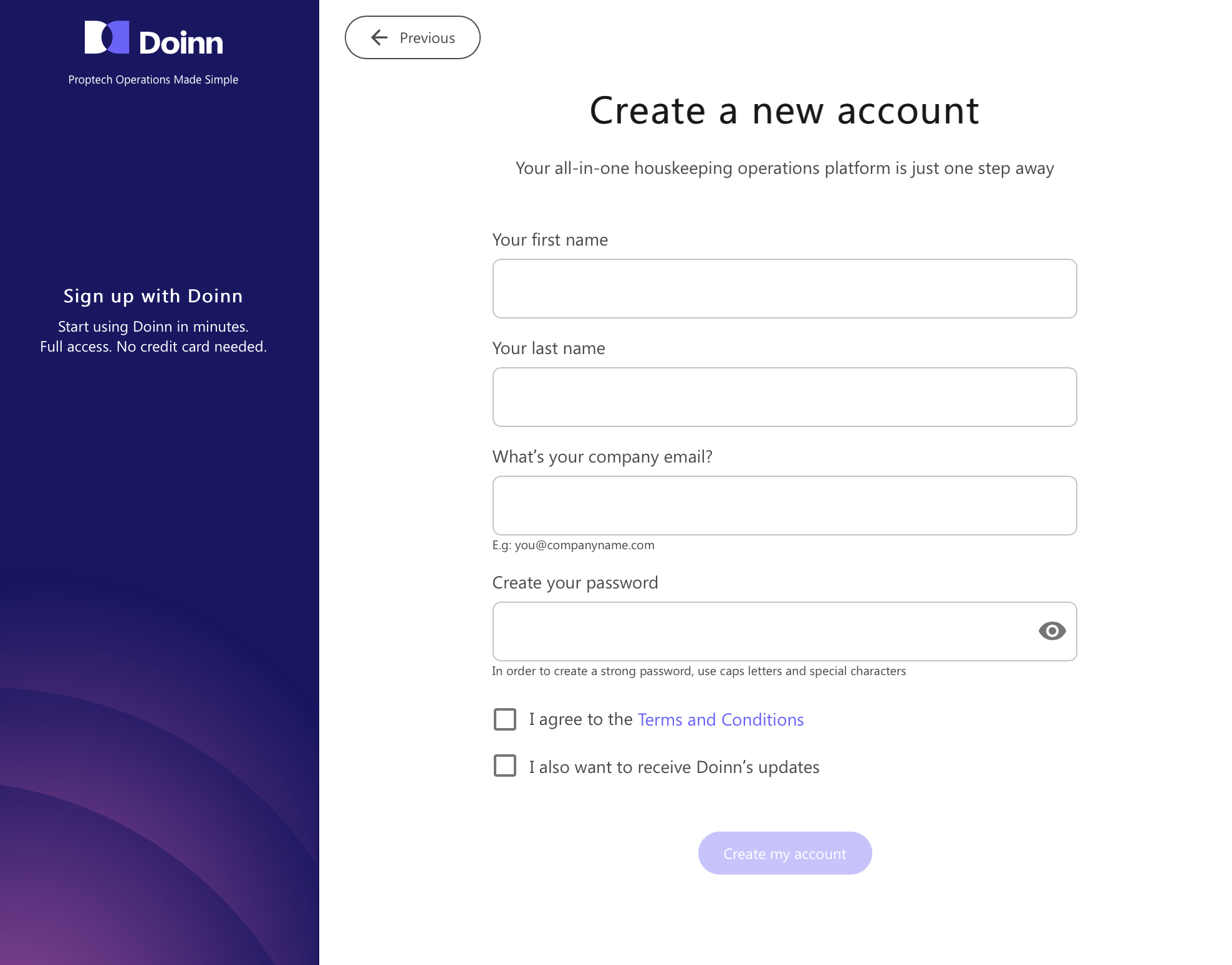
Go to Doinn website and choose **Sign in.** The onboarding is now starting, just follow the steps.
You will be required to add **cities where you operate, services per city and prices.**
- Fill the information as shown below to create your account
- A new window popup will show asking few more details and asking you how do you want to use Doinn. **Select the first option to get more Customer!**
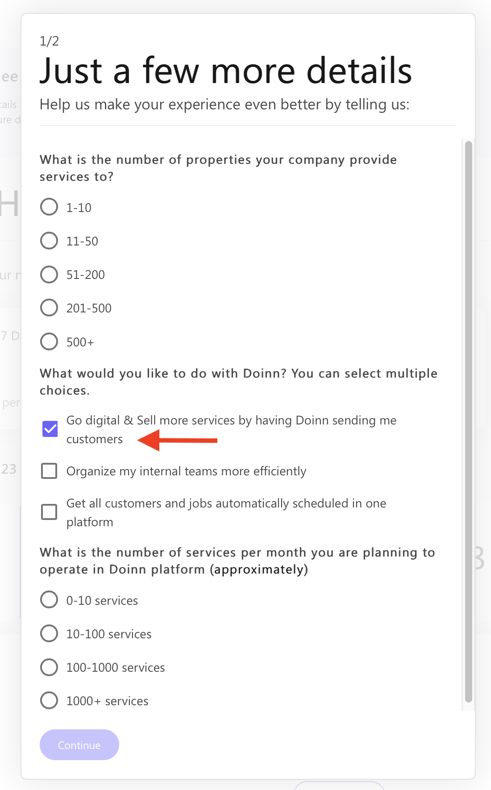
After you complete this setup, set a call with a Doinn rep by choosing on the calendar that will pop up. If you miss it, we will get in contact with you and we will start looking for customers and work as your sales team!
---
### 2. Become a seller
Welcome to Doinn! To start using it, follow the indications in the side popup window.
First thing you want to do is creating your catalogs. Select **Go to Seller onboarding** and onboard as a seller!
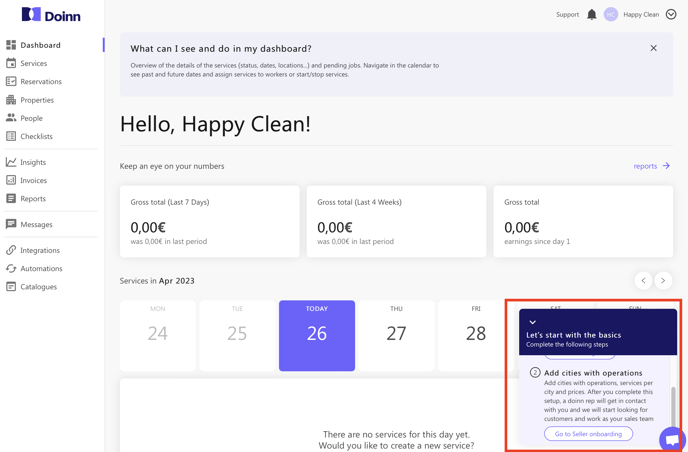
Check our article [Seller Onboarding](https://help.doinn.co/en/knowledge/seller-onboarding?hsLang=en) to know the procedure step by step.
---
### 3. Payments
With Doinn all your incomes from the executed services are available in the **Report Tab.**
**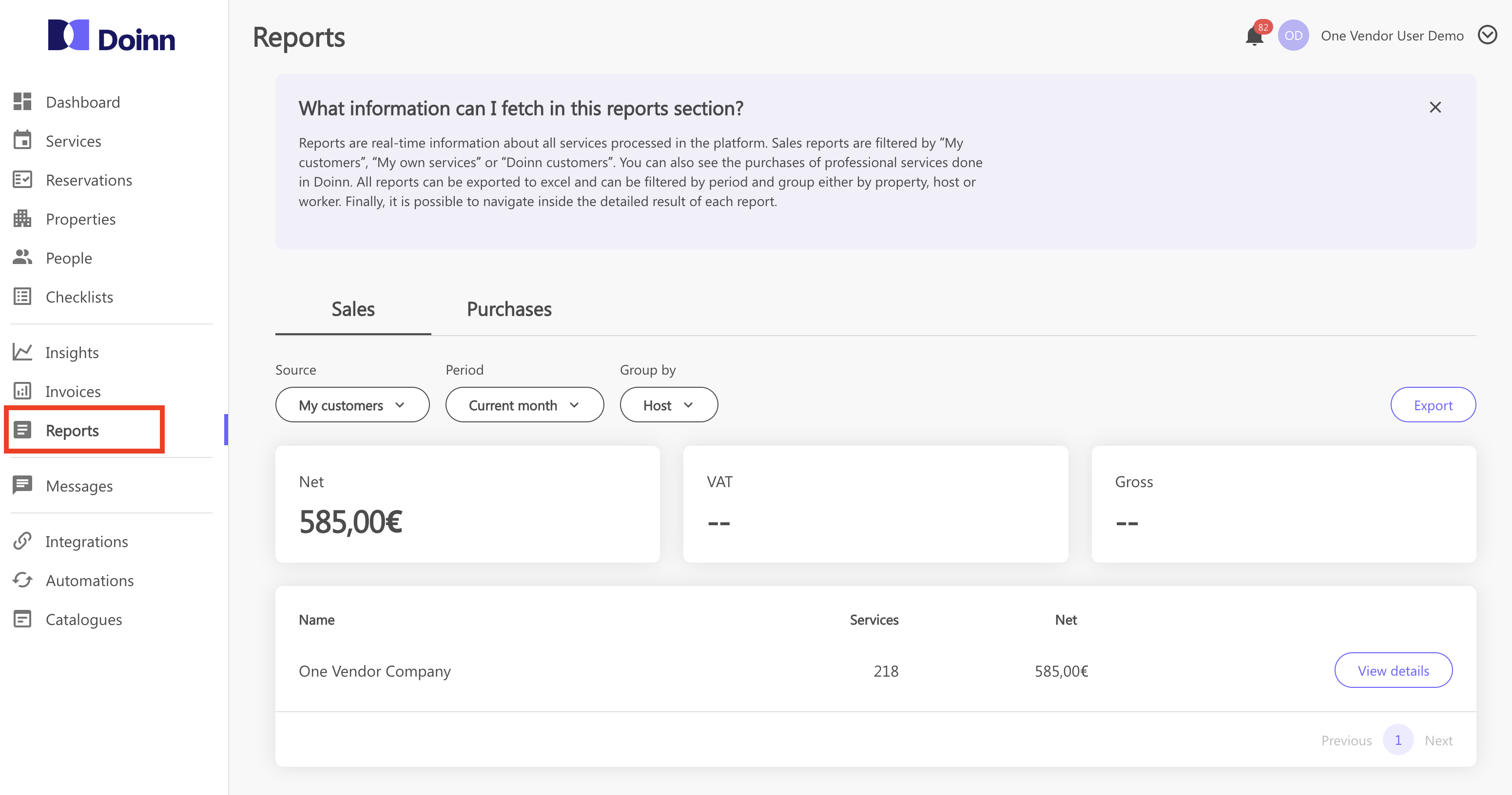**
Check our article [Reports - Menu](https://help.doinn.co/en/knowledge/reports-menu?hsLang=en) to discover more!
#### How to enable pay out that Doinn pays for the services directly in your company bank account?
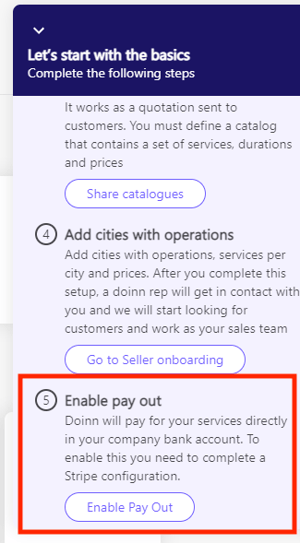
Doinn will pay for your services directly in your company bank account.
To enable this you need to complete a **Stripe** configuration. A message is displayed in a side popup in Doinn dashboard. Click and follow the Stripe configuration.
-png.png?width=330&height=237&name=image%20(1)-png.png)
Without configuring [Stripe](https://help.doinn.co/en/knowledge/process-payment-to-company-bank-account?hsLang=en), you will not be able to have your services payed!
---
### 4. Add your team
Add internal teams to co-operate more efficiently.
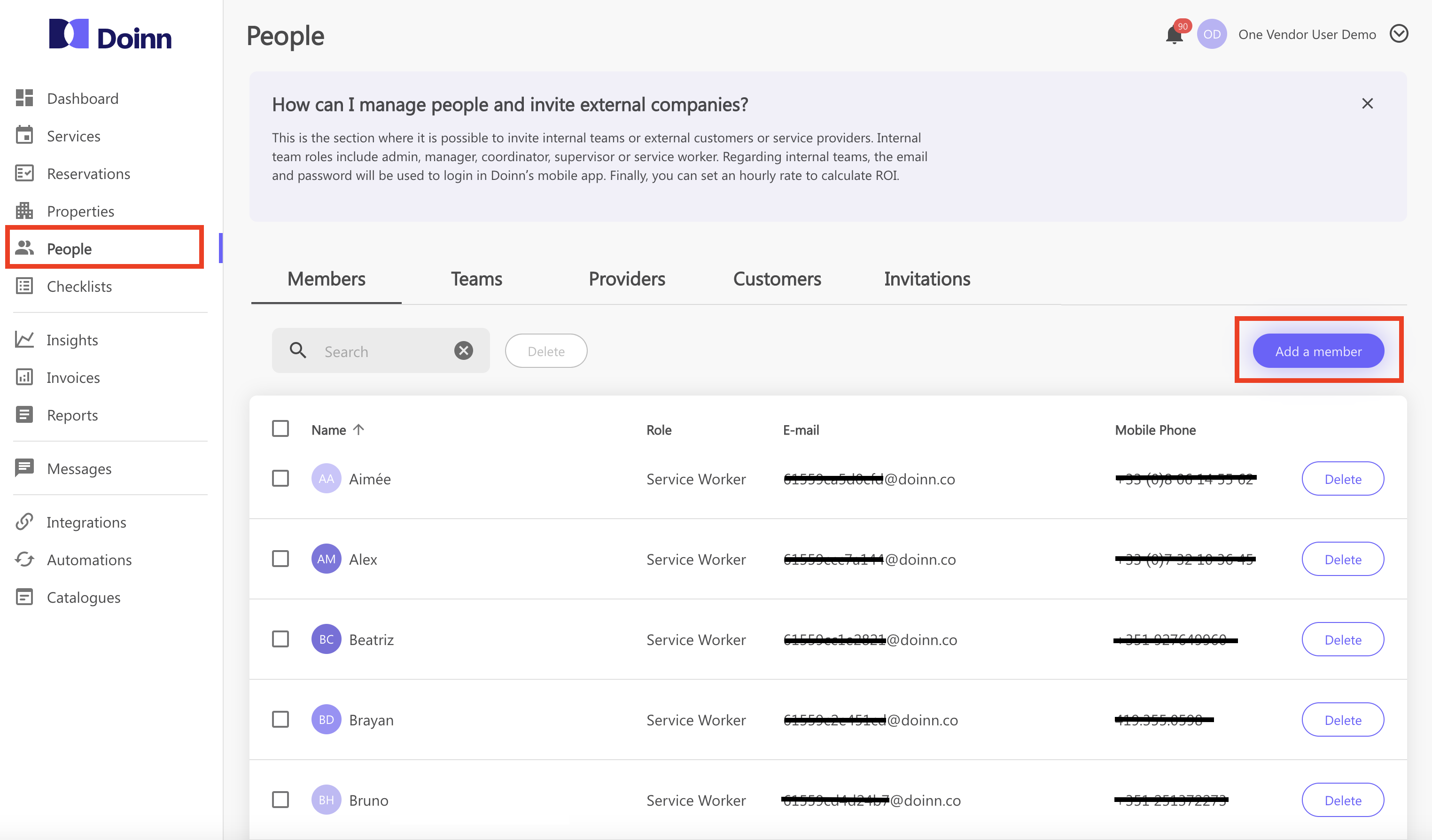
**Follow these steps:**
**a.** Go to People tab
**b.** Select **"Add a member"** from Member tab
**c.** Define the role of the member and fill the contact information
**d.** Send the invitation
**e.** Once the invitation is accepted check among your members
**d.** Select the new member and complete all the personal information needed
**e.** From tab Team, select **"Add a team"** and choose the members you want to group as team
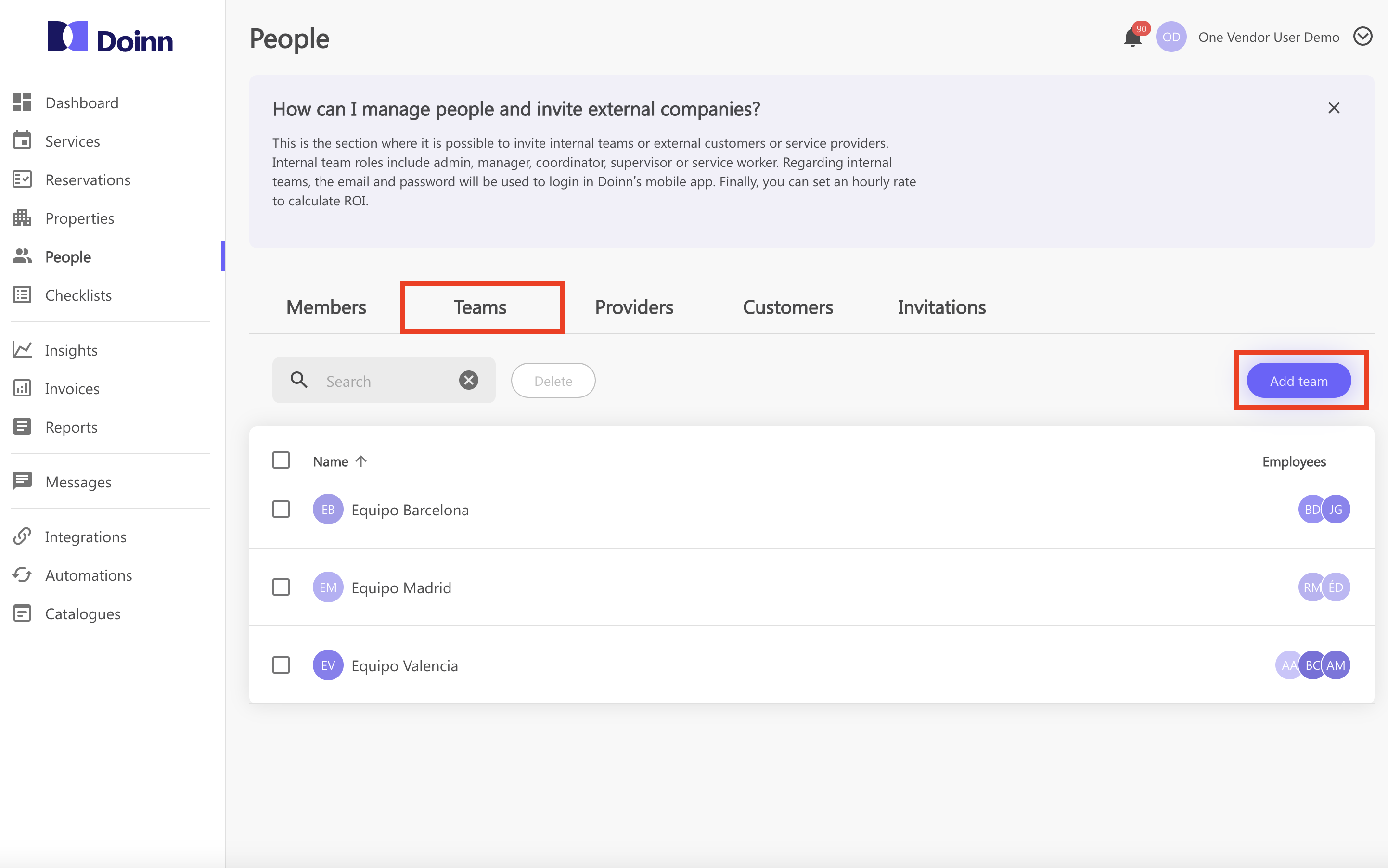
Check our article [People - Menu](https://help.doinn.co/en/knowledge/people-menu?hsLang=en) to learn how to set efficiently the People Tab
---
### 5. Services
Get all jobs from all customers in same dashboard.
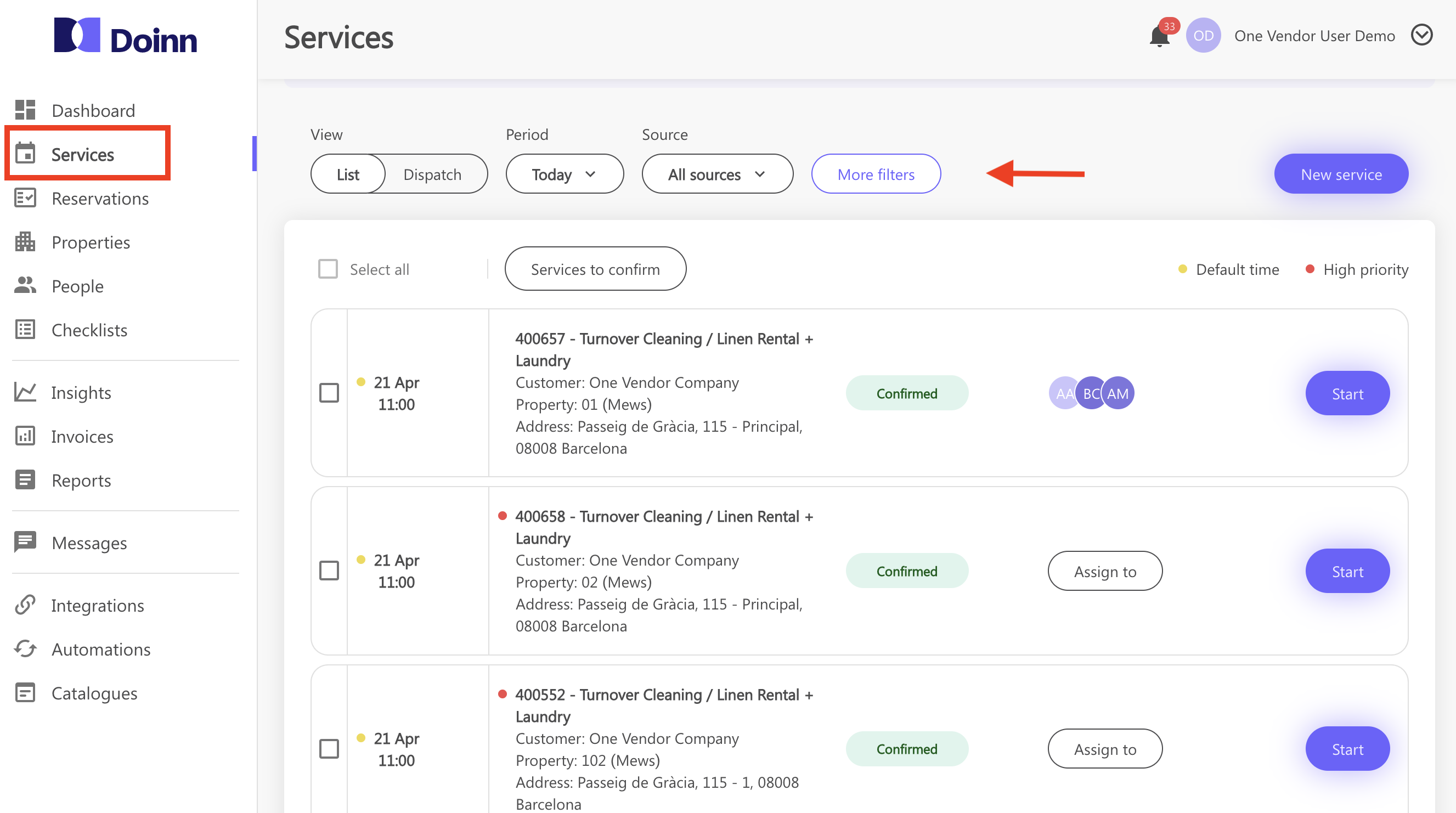
**Follow these steps:**
**a.** Go to Service tab
**b.** Use the filters to navigate among your period and source
**c.** [See the detail of each service](https://help.doinn.co/en/knowledge/services-menu-service-details?hsLang=en) and assign it to your team
**d.** [Use the Dispatch view to easily organize the workflow](https://help.doinn.co/en/knowledge/services-menu-dispatch-view?hsLang=en)
Check the articles [Services Menu - Services List View](https://help.doinn.co/en/knowledge/services-menu-services-list?hsLang=en) and [Services Menu - User Guide](https://help.doinn.co/en/knowledge/services-menu?hsLang=en) to find out more!
---
### 6. Invite customers
Invite customers to have all jobs is one app
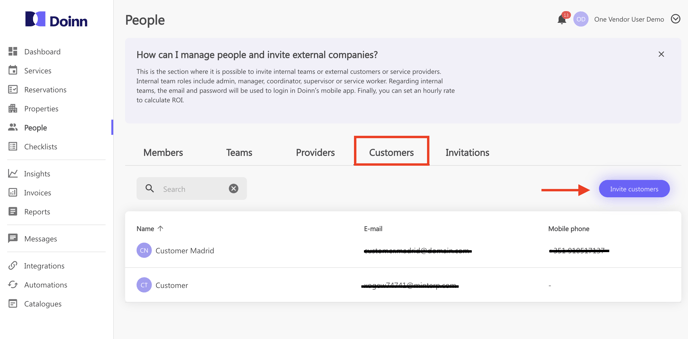
**Follow these steps:**
**a.** Go to People tab
**b.** Select **"Invite customer"** from Customer tab
**c.** Write the email address of your Customer/Customers you want to invite
**e.** Once the invitation is accepted it will be shown in your Customer tab
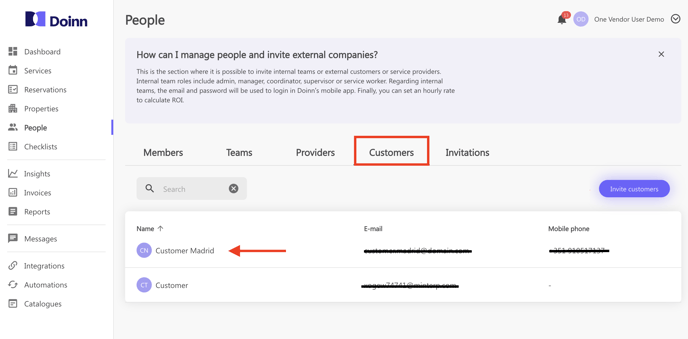
Check our article [People - Menu](https://help.doinn.co/en/knowledge/people-menu?hsLang=en) to learn how to set efficiently the People Tab
- [Doinn Academy](https://help.doinn.co/en/knowledge/doinn-academy?hsLang=en)
- [Getting Started](https://help.doinn.co/en/knowledge/getting-started?hsLang=en#main-content)
- [Set up the basics](https://help.doinn.co/en/knowledge/getting-started?hsLang=en#set-up-the-basics)
- [Using Doinn Platform](https://help.doinn.co/en/knowledge/using-doinn-platform?hsLang=en#main-content)
- [1. Connect - Integrations, Data Imports & CRM](https://help.doinn.co/en/knowledge/using-doinn-platform?hsLang=en#1-connect-integrations-data-imports-crm)
- [2. Automate - Scheduling, Dispatching & Service Pricing](https://help.doinn.co/en/knowledge/using-doinn-platform?hsLang=en#2-automate-scheduling-dispatching-service-pricing)
- [3. Elevate - Communications, Quality Assurance & Mobile App](https://help.doinn.co/en/knowledge/using-doinn-platform?hsLang=en#3-elevate-communications-quality-assurance-mobile-app)
- [4. Monitor/Predict - Reports, Insights & Forecasts](https://help.doinn.co/en/knowledge/using-doinn-platform?hsLang=en#4-monitor-predict-reports-insights-forecasts)
- [5. Buy professional services](https://help.doinn.co/en/knowledge/using-doinn-platform?hsLang=en#5-buy-professional-services)
- [6. Sell professional services](https://help.doinn.co/en/knowledge/using-doinn-platform?hsLang=en#6-sell-professional-services)
- [7. Account & Billing](https://help.doinn.co/en/knowledge/using-doinn-platform?hsLang=en#7-account-billing)
- [FAQ - Frequent Asked Questions](https://help.doinn.co/en/knowledge/faq-frequent-asked-questions?hsLang=en#main-content)
- [1. Connect - Integrations, Data Imports & CRM](https://help.doinn.co/en/knowledge/faq-frequent-asked-questions?hsLang=en#1-connect-integrations-data-imports-crm)
- [2. Automate - Scheduling, Dispatching & Service Pricing](https://help.doinn.co/en/knowledge/faq-frequent-asked-questions?hsLang=en#2-automate-scheduling-dispatching-service-pricing)
- [3 - Elevate - Communications, Quality Assurance & Mobile App](https://help.doinn.co/en/knowledge/faq-frequent-asked-questions?hsLang=en#3-elevate-communications-quality-assurance-mobile-app)
- [4. Monitor/Predict - Reports, Insights & Forecasts](https://help.doinn.co/en/knowledge/faq-frequent-asked-questions?hsLang=en#4-monitor-predict-reports-insights-forecasts)
- [5 - Buy professional services](https://help.doinn.co/en/knowledge/faq-frequent-asked-questions?hsLang=en#5-buy-professional-services)
- [6 - Sell professional services](https://help.doinn.co/en/knowledge/faq-frequent-asked-questions?hsLang=en#6-sell-professional-services)
- [7 - Account & Billing](https://help.doinn.co/en/knowledge/faq-frequent-asked-questions?hsLang=en#7-account-billing)
- [Doinn AI 🆕](https://help.doinn.co/en/knowledge/doinn-ai?hsLang=en)
- [Troubleshooting](https://help.doinn.co/en/knowledge/troubleshooting?hsLang=en#main-content)
- [1. Connect - Integrations, Data Imports & CRM](https://help.doinn.co/en/knowledge/troubleshooting?hsLang=en#1-connect-integrations-data-imports-crm)
- [2. Automate - Scheduling, Dispatching & Service Pricing](https://help.doinn.co/en/knowledge/troubleshooting?hsLang=en#2-automate-scheduling-dispatching-service-pricing)
- [3 - Elevate - Communications, Quality Assurance & Mobile App](https://help.doinn.co/en/knowledge/troubleshooting?hsLang=en#3-elevate-communications-quality-assurance-mobile-app)
- [5 - Buy professional services](https://help.doinn.co/en/knowledge/troubleshooting?hsLang=en#5-buy-professional-services)
- [7 - Account & Billing](https://help.doinn.co/en/knowledge/troubleshooting?hsLang=en#7-account-billing)
- [Best Practices](https://help.doinn.co/en/knowledge/best-practices?hsLang=en#main-content)
- [1. Connect - Integrations, Data Imports & CRM](https://help.doinn.co/en/knowledge/best-practices?hsLang=en#1-connect-integrations-data-imports-crm)
- [2. Automate - Scheduling, Dispatching & Service Pricing](https://help.doinn.co/en/knowledge/best-practices?hsLang=en#2-automate-scheduling-dispatching-service-pricing)
- [3 - Elevate - Communications, Quality Assurance & Mobile App](https://help.doinn.co/en/knowledge/best-practices?hsLang=en#3-elevate-communications-quality-assurance-mobile-app)
- [4. Monitor/Predict - Reports, Insights & Forecasts](https://help.doinn.co/en/knowledge/best-practices?hsLang=en#4-monitor-predict-reports-insights-forecasts)
- [7 - Account & Billing](https://help.doinn.co/en/knowledge/best-practices?hsLang=en#7-account-billing)
- [Integrations](https://help.doinn.co/en/knowledge/integrations?hsLang=en)
- [Product Updates](https://help.doinn.co/en/knowledge/product-updates?hsLang=en)
[](https://doinn.co/)