---
title: Integrations - Menu
description: What can I see and do in my Integrations - Menu
---
[Skip to content](https://help.doinn.co/en/knowledge/integrations-menu#main-content)
- [English](https://help.doinn.co/en/knowledge/integrations-menu)
- [Deutsch](https://help.doinn.co/de/knowledge/integrationen-menü)
- [Español](https://help.doinn.co/es/knowledge/integraciones-menú)
- [Italiano](https://help.doinn.co/it/knowledge/menu-integrazioni)
- [Português - Portugal](https://help.doinn.co/pt-pt/knowledge/menu-integrações)
English
Show submenu for translations
[Create support ticket](https://help.doinn.co/en/knowledge/kb-tickets/new?hsLang=en)
![logo\_horizontal\_negative\_v2\_help\_center-3.png\]](https://help.doinn.co/hs-fs/hubfs/logo_horizontal_negative_v2_help_center-3.png?width=140&height=63&name=logo_horizontal_negative_v2_help_center-3.png)
Open main navigation
Close main navigation
- - [English](https://help.doinn.co/en/knowledge/integrations-menu)
- [Deutsch](https://help.doinn.co/de/knowledge/integrationen-menü)
- [Español](https://help.doinn.co/es/knowledge/integraciones-menú)
- [Italiano](https://help.doinn.co/it/knowledge/menu-integrazioni)
- [Português - Portugal](https://help.doinn.co/pt-pt/knowledge/menu-integrações)
English
Show submenu for translations
- [Create support ticket](https://help.doinn.co/en/knowledge/kb-tickets/new)
Hello. How can we help you?
- There are no suggestions because the search field is empty.
1. [Help Center](https://help.doinn.co/en/knowledge?hsLang=en)
2. [Using Doinn Platform](https://help.doinn.co/en/knowledge/using-doinn-platform?hsLang=en)
3. [1. Connect - Integrations, Data Imports & CRM](https://help.doinn.co/en/knowledge/using-doinn-platform?hsLang=en#1-connect-integrations-data-imports-crm)
June 12, 2024
# Integrations - Menu
## What can I see and do in my Integrations - Menu
**Last Updated**: *June 12, 2024*
**Applies to:** *All registered users*
NOTE: Doinn integrates with many PMS and Channel Managers. These are the details about the properties and reservations that are fetched by our integrations into your Doinn account:
- **Properties**
- property name, code, category, area, address, zip code, country, nr bedrooms, nr bathrooms, number and type of beds
- **Reservations**
- Check-in date, Check-out date, Guest name, Guest phone, Guest email, Nr adults, Nr children
CAUTION: The exact data imported depends on what integration you activate!
Make sure you **verify the details of the integration** you want to activate and see which exact data is imported to your Doinn account
In your Integrations menu you can do the following actions:
- [Go to **Integrations centre** and add new integrations](https://help.doinn.co/en/knowledge/integrations-menu#integrationsmenu-integrationscentre)
- [Activate any of our API integrations with PMS/Channel Managers](https://help.doinn.co/en/knowledge/integrations-menu#Activate_new_int)
- [Enter credentials](https://help.doinn.co/en/knowledge/integrations-menu#Enter-Credencial)
- [Add integration - Add/Remove properties](https://help.doinn.co/en/knowledge/integrations-menu#integrationsmenu-addremoveprops)
- [Add integration - Sync new properties](https://help.doinn.co/en/knowledge/integrations-menu#Add_int_on_off)
TIP: You can add more than one integration and choose which properties are integrate with different PMS/Channel Managers
- [Check **My Integrations** to edit existing integrations](https://help.doinn.co/en/knowledge/integrations-menu#integrationmenu-myintegrations)
- [Rename](https://help.doinn.co/en/knowledge/integrations-menu#Rename)
- [Edit integration - Add/Remove properties](https://help.doinn.co/en/knowledge/integrations-menu#integrationsmenu-addremoveprops)
- [Edit integration - Sync new properties](https://help.doinn.co/en/knowledge/integrations-menu#Edit_sync)
- [Edit credentials](https://help.doinn.co/en/knowledge/integrations-menu#Edit-credential)
- [Delete](https://help.doinn.co/en/knowledge/integrations-menu#Delete)
- [Check Integration Status](https://help.doinn.co/en/knowledge/integrations-menu#Checl_status)
---
### Integrations Centre
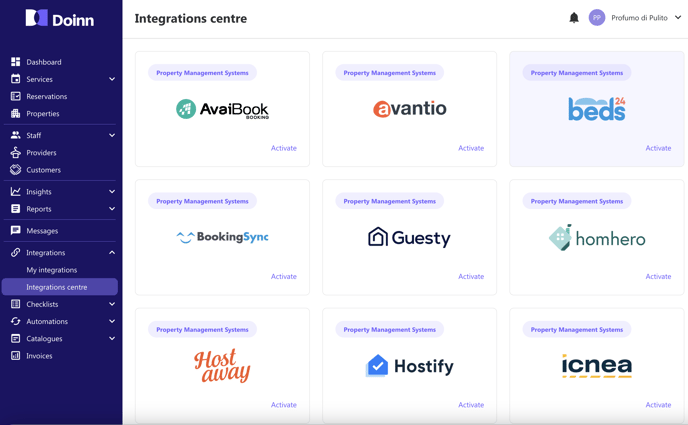
Current API integrations in Doinn are:
1. AvaiBook
2. Avantio
3. Beds24
4. BookingSync
5. Guesty
6. Homehero
7. Host away
8. Hostify
9. Icnea
10. Lodgify
11. Mews
12. Octorate
13. Rental United
14. Smoobu
15. Stays
16. Tokeet
17. Vreasy
For all integrations the procedure is the similar:
#### Activate new integration
- Inside Integrations Centre, activate your bookings software from the list by selecting the **Activate** button in the integration you want to add
#### Enter credentials
A new window will pop up where you can enter your software credentials (usually email and either a password or a token)
#### Add Integration - Add/Remove properties
Click in **Add more properties** where you can select/deselect properties and then click **Save**

CAUTION: There might be cases where properties are not visible in the list of properties. One of the common reasons is because the **latitude and longitude** (lat/long) is not set in your PMS or Channel Manager. Make sure this information is there for all properties because is **mandatory** in Doinn.
#### Add integration - Enable/Disable Sync new properties
At any moment you can decide if you want Doinn to sync every new properties from your software directly to Doinn or not. For any change in this flag, go to edit integration and change this option.
NOTE: Doinn is constantly adding more integrations. Ask us in case your software is still not in this list.
---
### My Integrations
The other actions you can perform inside integrations menu is to update an existing integration after it has being setup. Let's supose for a moment that the integration you have is from *Rentals United* and is called *RentalsUnited#1*, the options are:
#### **Rename**
To rename your integration name, go to the integration you want to rename and click on the 3 vertical points

Then click **Rename**

Finally add the new name for your integration and click **Save**:

#### Edit integration - Add/Remove properties
Every integration can be updated by adding/removing properties from the integration. To do so click the **3 vertical dots** inside the integration you want to add/remove properties and then edit the integration.
Finally click in **Add more properties** where you can select/deselect properties and then click **Save**

CAUTION: There might be cases where properties are not visible in the list of properties. One of the common reasons is because the **latitude and longitude** (lat/long) is not set in your PMS or Channel Manager. Make sure this information is there for all properties because is **mandatory** in Doinn.
#### Edit integration - Sync new properties
At any moment you can decide if you want Doinn to sync every new properties from your software directly to Doinn or not. For any change in this flag, go to edit integration and change this option.
#### Edit credentials
To change the credentials you need to click in the 3 vertical dots and then in **Edit credentials**
Then just change the credentials (they change depending on the different softwares usually email password or token)

#### Delete integration
When you decide to remove an integration, the system will ask you an important question first.
**The properties and services related to this integration will no longer be synchronized. Choose an option to continue:**
Option 1: **Keep all** properties and services previously created
Option 2: **Delete all** properties and services previously created
After you select your option, then click **Delete**.

#### Check Integration status
Status of the integration can be either:
**Incomplete** - there was some issue when configuring the integration
**Complete** - integration was setup correctly
In the example below for the Lodgify integration with **incomplete** status,
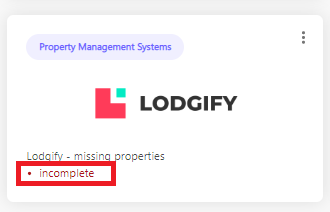
The issue is that there were no properties selected from the integration so that should be fixed by editing the integration and adding properties

After adding properties the status is changed to **complete** when successful
- [Doinn Academy](https://help.doinn.co/en/knowledge/doinn-academy?hsLang=en)
- [Getting Started](https://help.doinn.co/en/knowledge/getting-started?hsLang=en#main-content)
- [Set up the basics](https://help.doinn.co/en/knowledge/getting-started?hsLang=en#set-up-the-basics)
- [Using Doinn Platform](https://help.doinn.co/en/knowledge/using-doinn-platform?hsLang=en#main-content)
- [1. Connect - Integrations, Data Imports & CRM](https://help.doinn.co/en/knowledge/using-doinn-platform?hsLang=en#1-connect-integrations-data-imports-crm)
- [2. Automate - Scheduling, Dispatching & Service Pricing](https://help.doinn.co/en/knowledge/using-doinn-platform?hsLang=en#2-automate-scheduling-dispatching-service-pricing)
- [3. Elevate - Communications, Quality Assurance & Mobile App](https://help.doinn.co/en/knowledge/using-doinn-platform?hsLang=en#3-elevate-communications-quality-assurance-mobile-app)
- [4. Monitor/Predict - Reports, Insights & Forecasts](https://help.doinn.co/en/knowledge/using-doinn-platform?hsLang=en#4-monitor-predict-reports-insights-forecasts)
- [5. Buy professional services](https://help.doinn.co/en/knowledge/using-doinn-platform?hsLang=en#5-buy-professional-services)
- [6. Sell professional services](https://help.doinn.co/en/knowledge/using-doinn-platform?hsLang=en#6-sell-professional-services)
- [7. Account & Billing](https://help.doinn.co/en/knowledge/using-doinn-platform?hsLang=en#7-account-billing)
- [FAQ - Frequent Asked Questions](https://help.doinn.co/en/knowledge/faq-frequent-asked-questions?hsLang=en#main-content)
- [1. Connect - Integrations, Data Imports & CRM](https://help.doinn.co/en/knowledge/faq-frequent-asked-questions?hsLang=en#1-connect-integrations-data-imports-crm)
- [2. Automate - Scheduling, Dispatching & Service Pricing](https://help.doinn.co/en/knowledge/faq-frequent-asked-questions?hsLang=en#2-automate-scheduling-dispatching-service-pricing)
- [3 - Elevate - Communications, Quality Assurance & Mobile App](https://help.doinn.co/en/knowledge/faq-frequent-asked-questions?hsLang=en#3-elevate-communications-quality-assurance-mobile-app)
- [4. Monitor/Predict - Reports, Insights & Forecasts](https://help.doinn.co/en/knowledge/faq-frequent-asked-questions?hsLang=en#4-monitor-predict-reports-insights-forecasts)
- [5 - Buy professional services](https://help.doinn.co/en/knowledge/faq-frequent-asked-questions?hsLang=en#5-buy-professional-services)
- [6 - Sell professional services](https://help.doinn.co/en/knowledge/faq-frequent-asked-questions?hsLang=en#6-sell-professional-services)
- [7 - Account & Billing](https://help.doinn.co/en/knowledge/faq-frequent-asked-questions?hsLang=en#7-account-billing)
- [Doinn AI 🆕](https://help.doinn.co/en/knowledge/doinn-ai?hsLang=en)
- [Troubleshooting](https://help.doinn.co/en/knowledge/troubleshooting?hsLang=en#main-content)
- [1. Connect - Integrations, Data Imports & CRM](https://help.doinn.co/en/knowledge/troubleshooting?hsLang=en#1-connect-integrations-data-imports-crm)
- [2. Automate - Scheduling, Dispatching & Service Pricing](https://help.doinn.co/en/knowledge/troubleshooting?hsLang=en#2-automate-scheduling-dispatching-service-pricing)
- [3 - Elevate - Communications, Quality Assurance & Mobile App](https://help.doinn.co/en/knowledge/troubleshooting?hsLang=en#3-elevate-communications-quality-assurance-mobile-app)
- [5 - Buy professional services](https://help.doinn.co/en/knowledge/troubleshooting?hsLang=en#5-buy-professional-services)
- [7 - Account & Billing](https://help.doinn.co/en/knowledge/troubleshooting?hsLang=en#7-account-billing)
- [Best Practices](https://help.doinn.co/en/knowledge/best-practices?hsLang=en#main-content)
- [1. Connect - Integrations, Data Imports & CRM](https://help.doinn.co/en/knowledge/best-practices?hsLang=en#1-connect-integrations-data-imports-crm)
- [2. Automate - Scheduling, Dispatching & Service Pricing](https://help.doinn.co/en/knowledge/best-practices?hsLang=en#2-automate-scheduling-dispatching-service-pricing)
- [3 - Elevate - Communications, Quality Assurance & Mobile App](https://help.doinn.co/en/knowledge/best-practices?hsLang=en#3-elevate-communications-quality-assurance-mobile-app)
- [4. Monitor/Predict - Reports, Insights & Forecasts](https://help.doinn.co/en/knowledge/best-practices?hsLang=en#4-monitor-predict-reports-insights-forecasts)
- [7 - Account & Billing](https://help.doinn.co/en/knowledge/best-practices?hsLang=en#7-account-billing)
- [Integrations](https://help.doinn.co/en/knowledge/integrations?hsLang=en)
- [Product Updates](https://help.doinn.co/en/knowledge/product-updates?hsLang=en)
[](https://doinn.co/)