---
title: Create Checklists
description: How to create a specific Checklist
---
[Skip to content](https://help.doinn.co/en/knowledge/create-checklist#main-content)
- [English](https://help.doinn.co/en/knowledge/create-checklist)
- [Deutsch](https://help.doinn.co/de/knowledge/menü-checklisten)
- [Español](https://help.doinn.co/es/knowledge/checklist-menú)
- [Italiano](https://help.doinn.co/it/knowledge/menu-checklist)
- [Português - Portugal](https://help.doinn.co/pt-pt/knowledge/menu-checklists)
English
Show submenu for translations
[Create support ticket](https://help.doinn.co/en/knowledge/kb-tickets/new?hsLang=en)
![logo\_horizontal\_negative\_v2\_help\_center-3.png\]](https://help.doinn.co/hs-fs/hubfs/logo_horizontal_negative_v2_help_center-3.png?width=140&height=63&name=logo_horizontal_negative_v2_help_center-3.png)
Open main navigation
Close main navigation
- - [English](https://help.doinn.co/en/knowledge/create-checklist)
- [Deutsch](https://help.doinn.co/de/knowledge/menü-checklisten)
- [Español](https://help.doinn.co/es/knowledge/checklist-menú)
- [Italiano](https://help.doinn.co/it/knowledge/menu-checklist)
- [Português - Portugal](https://help.doinn.co/pt-pt/knowledge/menu-checklists)
English
Show submenu for translations
- [Create support ticket](https://help.doinn.co/en/knowledge/kb-tickets/new)
Hello. How can we help you?
- There are no suggestions because the search field is empty.
1. [Help Center](https://help.doinn.co/en/knowledge?hsLang=en)
2. [Using Doinn Platform](https://help.doinn.co/en/knowledge/using-doinn-platform?hsLang=en)
3. [3. Elevate - Communications, Quality Assurance & Mobile App](https://help.doinn.co/en/knowledge/using-doinn-platform?hsLang=en#3-elevate-communications-quality-assurance-mobile-app)
May 22, 2024
# Create Checklists
## How to create a specific Checklist
**Last Updated**: *May 22, 2024*
**Applies to:** *All users*
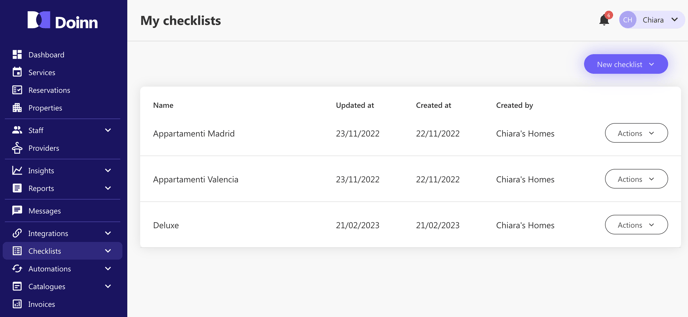
Never miss a task! Use our tool and create all the needed checklists in order to make sure that all your instructions are followed and checked.
### How to use the checklist tool
Once you are in the **checklist tab**, you can easily create new checklists or copy one from the **Templates section** and personalized it.
Let's see step by step how to use this powerful tool.
1. [New checklist](https://help.doinn.co/en/knowledge/create-checklist#NewChecklist)
2. [Checklist Actions - Edit, make a copy, delete](https://help.doinn.co/en/knowledge/create-checklist#ChekclistActions)
3. [My Checklists view](https://help.doinn.co/en/knowledge/create-checklist#Checklistview)
4. [Checklist details](https://help.doinn.co/en/knowledge/create-checklist#Details)
5. [Checklists Templates](https://help.doinn.co/en/knowledge/create-checklist#Template)
---
### 1. New Checklist
In the Checklist section select **New Checklist** and choose if create one or if upload more en bulk.
1a. [One checklist](https://help.doinn.co/en/knowledge/create-checklist#one_checklist)
1b. [Bulk import](https://help.doinn.co/en/knowledge/create-checklist#bulk_import)
#### 1a. One checklist
- **Choose a title**
**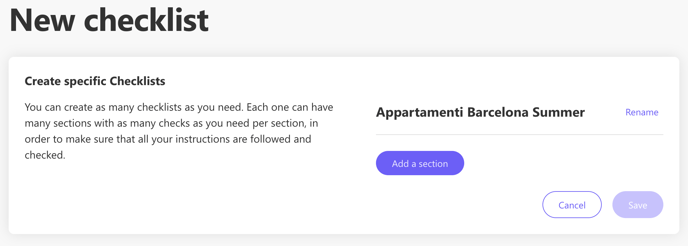**
**Tip**: Use a title that is easily recognizable
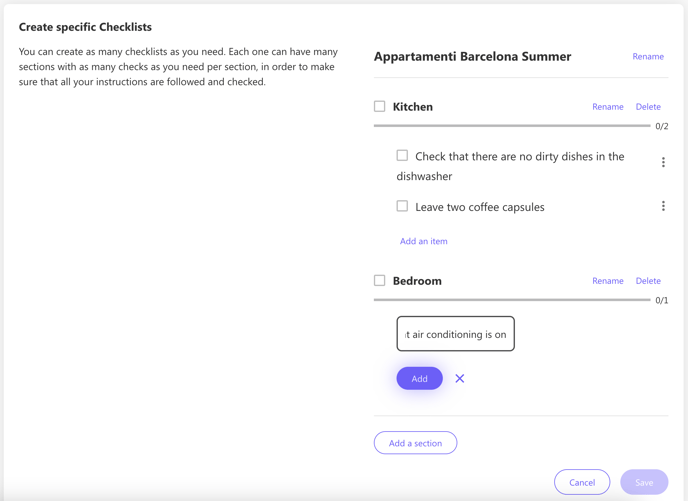
- **Add Sections and Items** (action per section)
Create sections according to your needs and add items to each section:
****
- Save
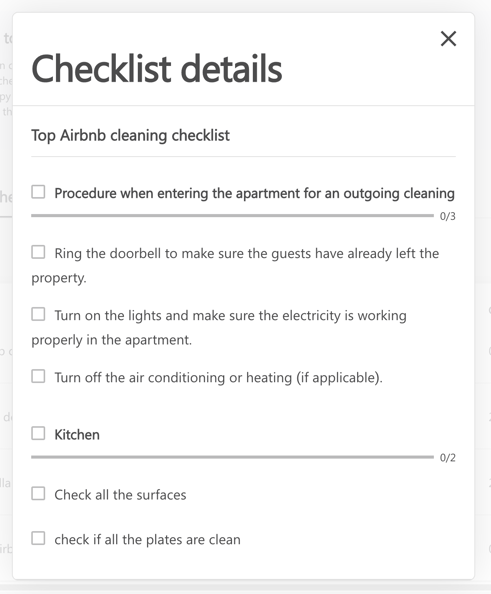
- The checklist is now displayed in your checklist tab.
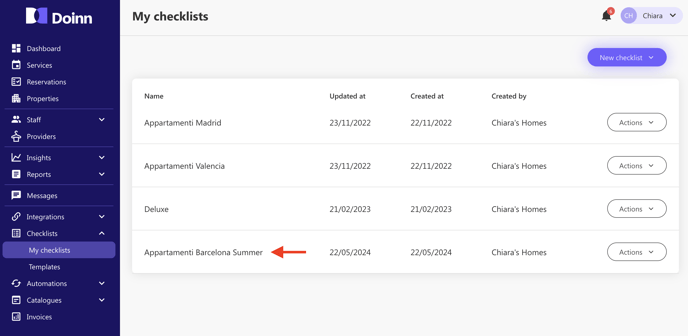
To see the specs of each checklist created, simply click on it to see all the sections and item set.
#### 1b. Bulk import
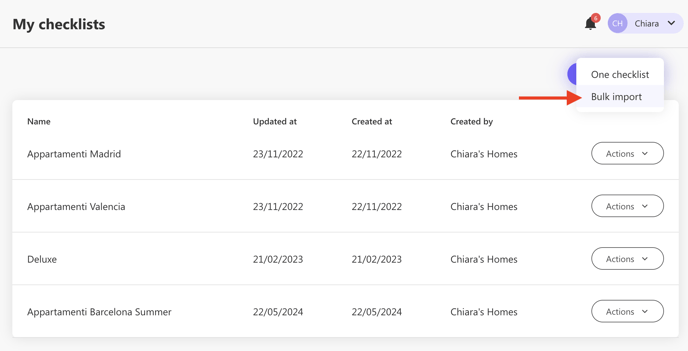
- Select Bulk import
- **Download the template** and fill it with the information required:
- Checklist name
- Section name
- Item name
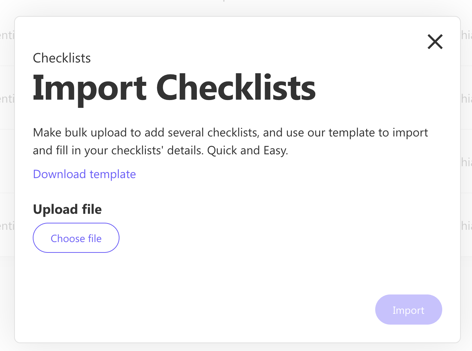
- Save the excel and upload it to import it.
- Your checklists will be displayed in your checklist tab.
---
### 2. Checklist Actions
Not only you can create your personals checklists, but you can also do other actions such as edit, make a copy or delete them. It's very easy, check what you can do!
You can access to these options by clicking the **Actions menu** of the chosen checklist:
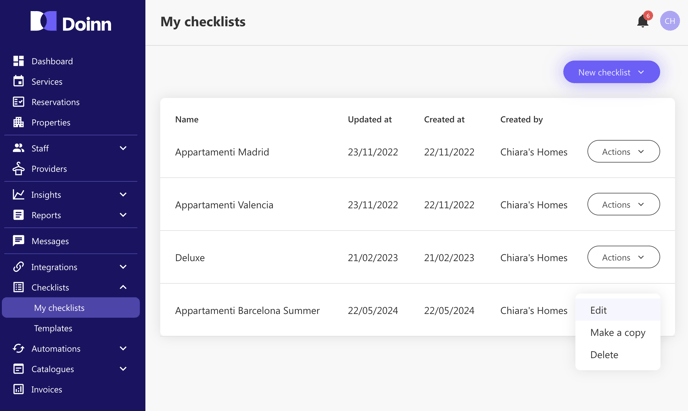
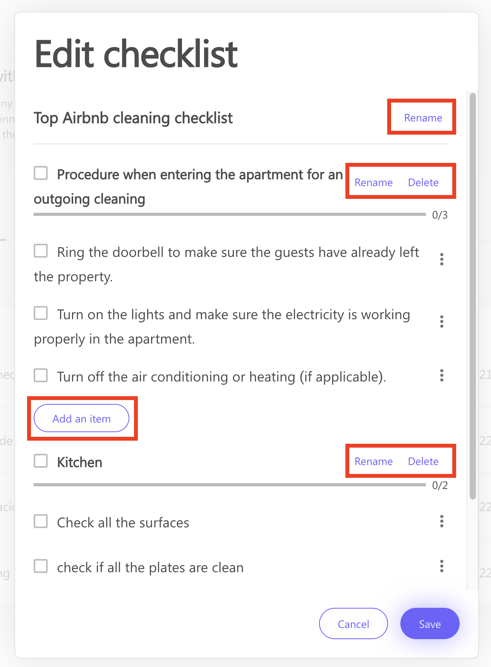
**a. Edit**
Select the checklist you want to edit and these are the actions you can do:
- rename the checklist
- rename, remove or add sections and items
****
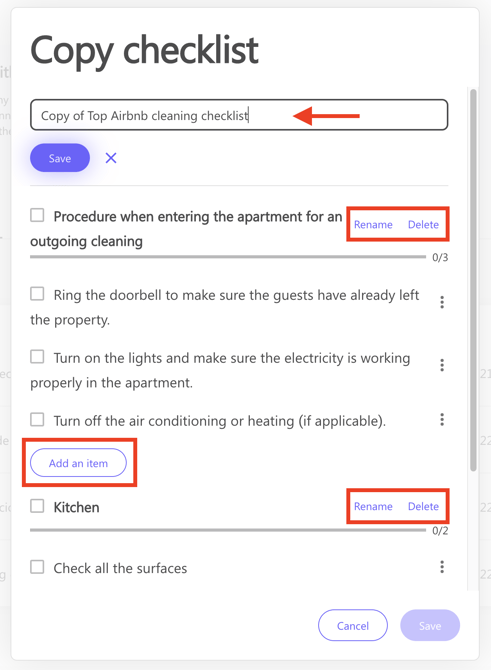
**b. Make a copy**
Select the checklist you want to copy. You can also make all the edits needed for the new checklist
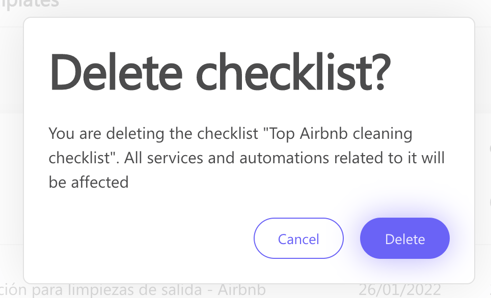
**c. Delete**
You can also delte a checklist, as shown in the image.
---
### 3. My Checklists view
Once created a Checklist, this will be displayed in your Checklist tab.
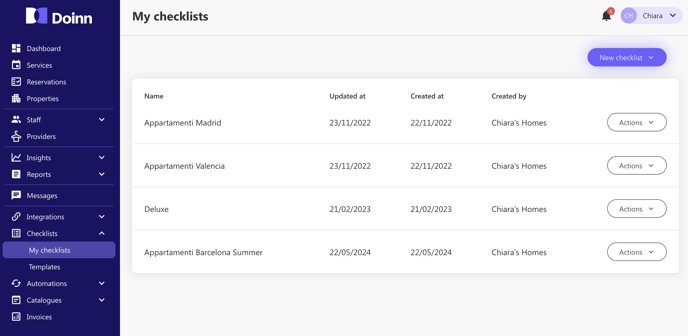
You can create multiple checklists according to your needs and use it in your automatizations or when buying a single service.
Manage them and never miss a task!
---
### 4. My Checklists details
Every time you want to know the details of your checklists you can simply click on it and see all the details. As shown [here](https://help.doinn.co/en/knowledge/create-checklist#ChekclistActions) you can make all the edits in order to keep your list updated.

---
### 5. Checklists Templates
You can create all the checklists needed, but in case you need for some help, you can go and check among the templates.
**Go the the Checklist tab** and Select **Templates.**
Now you can **make a copy** editing the sections and the items needed.
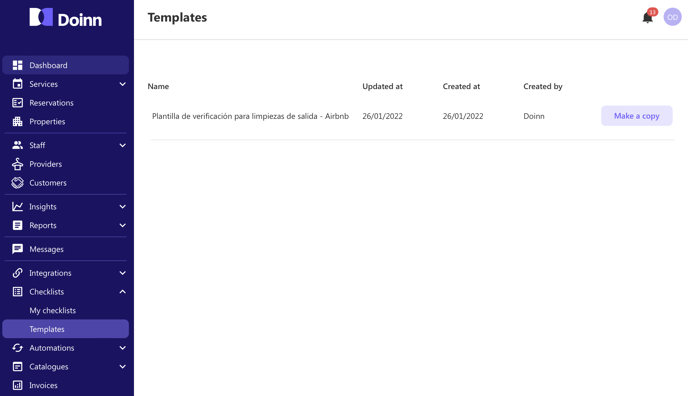
Once done, your new checklist will be displayed in "My checklist" panel.
- [Doinn Academy](https://help.doinn.co/en/knowledge/doinn-academy?hsLang=en)
- [Getting Started](https://help.doinn.co/en/knowledge/getting-started?hsLang=en#main-content)
- [Set up the basics](https://help.doinn.co/en/knowledge/getting-started?hsLang=en#set-up-the-basics)
- [Using Doinn Platform](https://help.doinn.co/en/knowledge/using-doinn-platform?hsLang=en#main-content)
- [1. Connect - Integrations, Data Imports & CRM](https://help.doinn.co/en/knowledge/using-doinn-platform?hsLang=en#1-connect-integrations-data-imports-crm)
- [2. Automate - Scheduling, Dispatching & Service Pricing](https://help.doinn.co/en/knowledge/using-doinn-platform?hsLang=en#2-automate-scheduling-dispatching-service-pricing)
- [3. Elevate - Communications, Quality Assurance & Mobile App](https://help.doinn.co/en/knowledge/using-doinn-platform?hsLang=en#3-elevate-communications-quality-assurance-mobile-app)
- [4. Monitor/Predict - Reports, Insights & Forecasts](https://help.doinn.co/en/knowledge/using-doinn-platform?hsLang=en#4-monitor-predict-reports-insights-forecasts)
- [5. Buy professional services](https://help.doinn.co/en/knowledge/using-doinn-platform?hsLang=en#5-buy-professional-services)
- [6. Sell professional services](https://help.doinn.co/en/knowledge/using-doinn-platform?hsLang=en#6-sell-professional-services)
- [7. Account & Billing](https://help.doinn.co/en/knowledge/using-doinn-platform?hsLang=en#7-account-billing)
- [FAQ - Frequent Asked Questions](https://help.doinn.co/en/knowledge/faq-frequent-asked-questions?hsLang=en#main-content)
- [1. Connect - Integrations, Data Imports & CRM](https://help.doinn.co/en/knowledge/faq-frequent-asked-questions?hsLang=en#1-connect-integrations-data-imports-crm)
- [2. Automate - Scheduling, Dispatching & Service Pricing](https://help.doinn.co/en/knowledge/faq-frequent-asked-questions?hsLang=en#2-automate-scheduling-dispatching-service-pricing)
- [3 - Elevate - Communications, Quality Assurance & Mobile App](https://help.doinn.co/en/knowledge/faq-frequent-asked-questions?hsLang=en#3-elevate-communications-quality-assurance-mobile-app)
- [4. Monitor/Predict - Reports, Insights & Forecasts](https://help.doinn.co/en/knowledge/faq-frequent-asked-questions?hsLang=en#4-monitor-predict-reports-insights-forecasts)
- [5 - Buy professional services](https://help.doinn.co/en/knowledge/faq-frequent-asked-questions?hsLang=en#5-buy-professional-services)
- [6 - Sell professional services](https://help.doinn.co/en/knowledge/faq-frequent-asked-questions?hsLang=en#6-sell-professional-services)
- [7 - Account & Billing](https://help.doinn.co/en/knowledge/faq-frequent-asked-questions?hsLang=en#7-account-billing)
- [Doinn AI 🆕](https://help.doinn.co/en/knowledge/doinn-ai?hsLang=en)
- [Troubleshooting](https://help.doinn.co/en/knowledge/troubleshooting?hsLang=en#main-content)
- [1. Connect - Integrations, Data Imports & CRM](https://help.doinn.co/en/knowledge/troubleshooting?hsLang=en#1-connect-integrations-data-imports-crm)
- [2. Automate - Scheduling, Dispatching & Service Pricing](https://help.doinn.co/en/knowledge/troubleshooting?hsLang=en#2-automate-scheduling-dispatching-service-pricing)
- [3 - Elevate - Communications, Quality Assurance & Mobile App](https://help.doinn.co/en/knowledge/troubleshooting?hsLang=en#3-elevate-communications-quality-assurance-mobile-app)
- [5 - Buy professional services](https://help.doinn.co/en/knowledge/troubleshooting?hsLang=en#5-buy-professional-services)
- [7 - Account & Billing](https://help.doinn.co/en/knowledge/troubleshooting?hsLang=en#7-account-billing)
- [Best Practices](https://help.doinn.co/en/knowledge/best-practices?hsLang=en#main-content)
- [1. Connect - Integrations, Data Imports & CRM](https://help.doinn.co/en/knowledge/best-practices?hsLang=en#1-connect-integrations-data-imports-crm)
- [2. Automate - Scheduling, Dispatching & Service Pricing](https://help.doinn.co/en/knowledge/best-practices?hsLang=en#2-automate-scheduling-dispatching-service-pricing)
- [3 - Elevate - Communications, Quality Assurance & Mobile App](https://help.doinn.co/en/knowledge/best-practices?hsLang=en#3-elevate-communications-quality-assurance-mobile-app)
- [4. Monitor/Predict - Reports, Insights & Forecasts](https://help.doinn.co/en/knowledge/best-practices?hsLang=en#4-monitor-predict-reports-insights-forecasts)
- [7 - Account & Billing](https://help.doinn.co/en/knowledge/best-practices?hsLang=en#7-account-billing)
- [Integrations](https://help.doinn.co/en/knowledge/integrations?hsLang=en)
- [Product Updates](https://help.doinn.co/en/knowledge/product-updates?hsLang=en)
[](https://doinn.co/)